While Apple methodically removes Russian apps from the App Store, some of them have learned to sneak back in — just under a different name. That’s exactly what the creators of Avito did: their new app is already available for free download on iPhone, works fully, and most importantly, can send push notifications again.
We explain how to easily get Avito back on your iPhone
Why Avito Is Not on iPhone
It all started in May 2025, when Avito was removed from the App Store — suddenly and without explanation. The company itself wrote that it was negotiating with Apple and trying to figure out the reasons. Experts linked the incident to sanctions: in 2023, the U.S. Treasury Department imposed restrictions on the service’s co-owner Ivan Tavrin, and in 2025, half of Avito was transferred to a structure of Rosselkhozbank — also under sanctions.
Those who had the app installed could continue using it — but push notifications stopped coming through. If a buyer or seller messaged you — you’d only find out if you opened the app yourself. Annoyingly inconvenient.
How Avito Returned to the App Store
Russian companies have learned to bypass App Store restrictions through subsidiary structures in third countries — Kazakhstan, Armenia, UAE. The app is formally published under the name of a new company not linked to sanctions lists. The new Avito app operates under exactly this scheme.
In the App Store, it’s called “Auction Au.ru” — a classifieds board that is visually and functionally identical to Avito. The developer is LLC “Auction 24au.ru”. Just this week, a major update to version 217.0 was released with an expanded database of listings across the entire country. The app is free and works with iOS 15.2 and newer.
How to Download Avito on iPhone
Downloading Avito on iPhone with notifications is easy. Here are the instructions:
- Follow the link directly from Safari to download Avito from the App Store
- Or open the App Store and search for the app manually using the query “Au.ru listings” or “Auction Au.ru”.
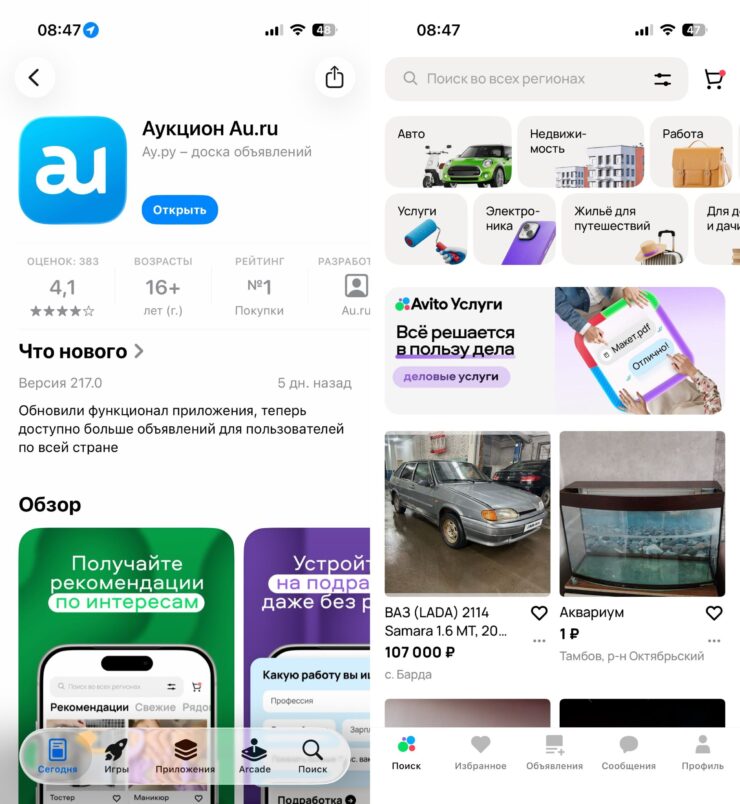
Now you’ll receive Avito notifications on your iPhone
- Tap “Download” — the app is free, no card required.
- After installation, open the app and sign in with your phone number.
- When the system asks about notifications — make sure to tap “Allow.” It’s precisely this permission that will let you receive push notifications in real time again — just like in the old Avito before it was removed.
Done. The app size is about 690 MB, so it’s faster to download over Wi-Fi.
Avito Notifications on iPhone
The new app has everything you’re used to from Avito:
- Buy and sell — any goods with delivery or pickup
- Cars — VIN checks, parts, rentals
- Real estate — apartments and houses for rent and sale
- Jobs — vacancies near your home and remote positions
- Services — handymen, tutors, movers
- Built-in messenger — chat directly in the app
- Push notifications — arrive instantly, you won’t miss anything
We recommend hurrying with the installation, as Apple actively monitors such schemes and periodically removes these apps. That’s why you should download it right now while it’s available — an installed app typically continues to work even after being removed from the store.