Avito is not in the App Store or Google Play, but you can still find it
In 2026, many Russian apps on iPhone are unavailable. For example, Apple constantly removes the Avito app on iOS, but the developers always find workarounds. The same thing happened this time — the official app was removed, but the company simply released it under a different name. So where can you find a working Avito app for iPhone, why does this keep happening, and why don’t Android users have this headache?
Why Avito Was Removed From iPhones
It all comes down to sanctions. In 2023, the U.S. Treasury imposed restrictions on Avito co-owner Ivan Tavrin, and in 2025, part of the company was transferred to a Rosselkhozbank-affiliated entity — also under sanctions. Apple’s response is predictable: it removes apps from the Russian App Store without entering into negotiations.
Those who had Avito installed beforehand could continue using it, but Avito notifications stopped working entirely.
Notifications are important because when it comes to selling things like Labubu and Wakuku collectibles, it’s crucial not to miss new messages.
How to Get an App Published in the App Store
Of course, iPhone restrictions don’t work all that well. Russian developers whose apps were removed from the Apple app store quickly figured out how to get an app into the App Store without raising suspicion.
It’s simple. They return to the market under different names. Companies register subsidiaries in other countries like Kazakhstan and publish the app under a different entity that isn’t on sanctions lists. The trick works, but App Store moderators eventually find cloned apps and remove them again. The developers then simply register a new name and republish the app under a new title.
How to Install Avito on iPhone
The Avito developers used the same trick. The new app is called “Аукцион Au.ru” (Auction Au.ru), published by the developer OOO “Аукцион 24ау.ру”. It’s a complete copy of the Avito app: listings, built-in messenger, delivery, auto, real estate, and job postings.
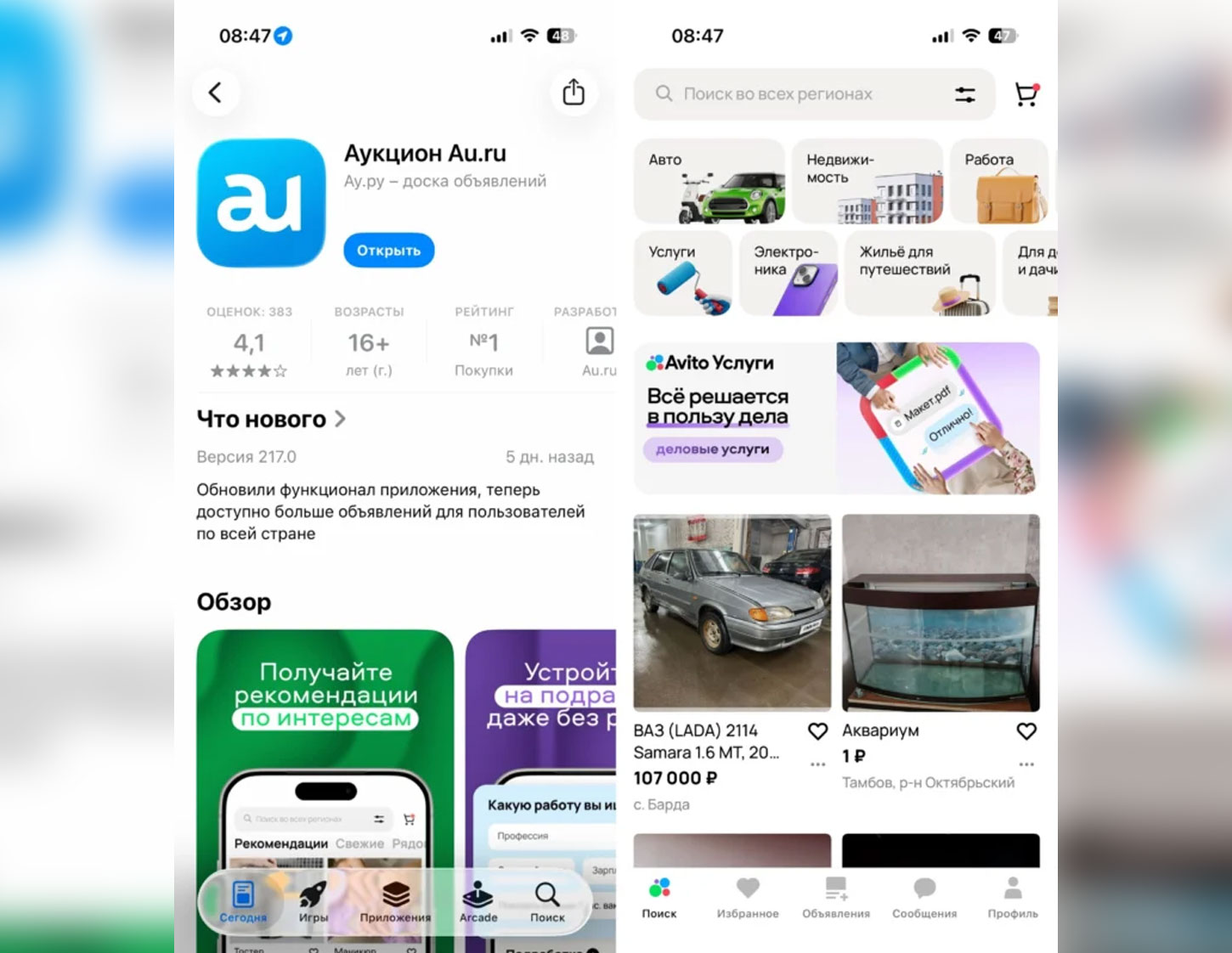
“Auction Au.ru” in the App Store. Image source: appleinsider.ru
How to find Avito in the App Store:
- Open the App Store and search for “Au.ru объявления” or “Аукцион Au.ru”;
- Tap “Download.” It’s about 690 MB, so it’s best to download over Wi-Fi;
- On the first launch, allow notifications so they start working again.
TIP: As mentioned above, Apple actively monitors such schemes and periodically removes these apps. Download it now — an installed app typically continues to work even after it's been removed from the store.
How to Download Avito on Android
Android users have far fewer problems with apps because there are several installation methods available. In 2024, the Avito app in Google Play also disappeared. However, users can install the Avito APK through the official website. The free classifieds app is also available in Google Play alternatives.
Here are all the ways to download Avito on Android:
Or simply search for “Avito” and install it.