Digital ID in MAX was designed as a convenient replacement for paper documents in a number of everyday scenarios. We’ve already explored what happens when you create a Digital ID in the national messenger, but in practice there are situations when you need to remove it: for example, if you no longer want to store such data in the app, you’re switching devices, or you plan to go through verification again. In MAX itself, this feature isn’t buried too deep, but without a hint it’s easy to miss.

Digital ID can be deleted in a couple of taps. Image: vk.company
Where to Find Digital ID in MAX
You won’t find the needed function in chats, in the security section, or in your smartphone’s system settings. MAX places Digital ID management inside your profile, where personal account settings and related services are gathered. That’s where the Digital ID card opens if it was already created earlier.
This is an important point because many users start looking for the deletion option through the full account menu and risk going to the wrong place. In MAX, the profile itself is deleted separately and the Digital ID is deleted separately — these are not the same action. Deleting the profile affects the entire account, message history, and chat participation, while the Digital ID is removed separately through its own settings. So you need to act carefully and not confuse these options with each other.
How to Delete Documents from Digital ID in MAX
The Digital ID deletion procedure itself looks quite simple and takes less than a minute. To do this, follow these steps:
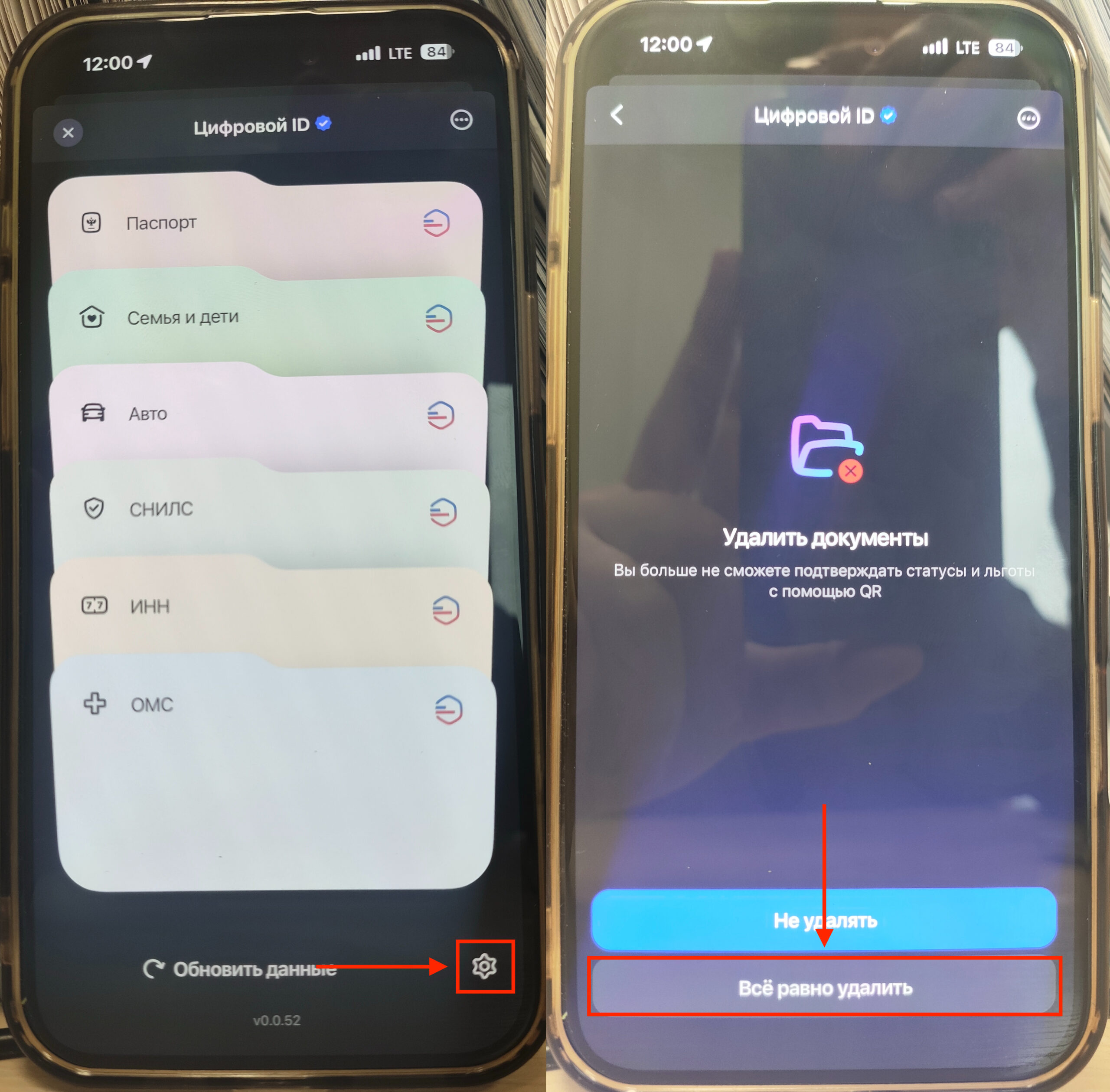
Unfortunately, you can’t even take screenshots of the deletion
- Open the “Profile” tab in MAX;
- Go to the “Digital ID” section;
- Scroll all the way down and tap the gear icon;
- On the page that opens, tap “Delete all documents” and confirm the action.
After confirmation, the Digital ID will be unlinked from your current profile in the app. This is useful if you want to remove access to digital documents from the messenger, temporarily opt out of using the feature, or prepare for re-issuing the ID. It’s important to understand that this specifically refers to deleting the Digital ID within MAX, not deactivating your messenger account. Therefore, chats, contacts, and the profile itself will remain intact after this.
What Changes After Deleting the Digital ID
After deletion, you will no longer be able to use the Digital ID QR code to verify age, status, or access related documents directly from MAX. If you previously opened such a section as a digital document equivalent, after deletion it will become unavailable until you create it again. This makes sense: the service deletes specifically the working Digital ID link to your device and app.
At the same time, the MAX account itself will continue to work as usual. You’ll be able to message, call, use channels, and all other messenger functions without restrictions, as long as they aren’t tied specifically to the Digital ID. This is convenient because the deletion doesn’t become a drastic measure and doesn’t require you to set up the entire profile again. In fact, you’re only removing one specific digital tool, not the entire account.
When Deleting the Digital ID Is Actually Necessary
The main scenario is related to switching devices. MAX specifically notes that the Digital ID can only be linked to one device, and if you’re changing smartphones, you’ll need to delete the ID on the old one and create it on the new one. The process is generally quick and, as you’ve already seen, completely straightforward.
For this reason, deletion may be needed not only for privacy concerns but also simply for correctly transferring the function to another smartphone. If you understand this logic in advance, you’ll have significantly fewer questions about how MAX works.
How Deleting Digital ID Differs from Deleting a MAX Profile

Don’t confuse deleting Digital ID with deleting your account in the MAX messenger. Image: vedomosti.ru
The most important thing is not to confuse account deletion and Digital ID deletion in MAX. Deleting a profile in MAX triggers a completely different process: the account is marked for deletion, and then the profile is removed from all devices along with message history and chat participation.
Moreover, after submitting the request, the profile can still be used for 30 more days, after which it is permanently deleted. This is an incomparably more serious action than deleting the Digital ID. Digital ID deletion works precisely and does not affect your conversations. Therefore, if you only need to remove digital identification from MAX, there’s no need to delete the entire profile.


