After the blocking of foreign alternatives, we are all gradually switching to the national messenger, despite the dangers of the MAX app, and starting to relearn how to communicate over the internet. The service is new and unexplored, so many questions arise about how it works and its individual features. For example, how to delete a message in MAX? It might seem like there’s nothing complicated about it, but maybe the national messenger decided to play by its own rules here too?

Learning how to properly delete messages in MAX
How to Delete a Message in a MAX Chat
Can you delete messages in MAX? Yes, in this regard the national messenger is no different from its alternatives. You can delete both your own messages and others’, but with some nuances:
- Other people’s messages can only be deleted on your end;
- Your own messages can be deleted from the other person’s device only within a limited time frame.
And now here’s the guide on how to delete unnecessary messages in MAX:
- Open the chat.
- Long-press on the message.
- If needed, select other messages.
- Tap the “trash” icon in the upper right corner of the screen.
- Choose who to delete the messages for: yourself or everyone.
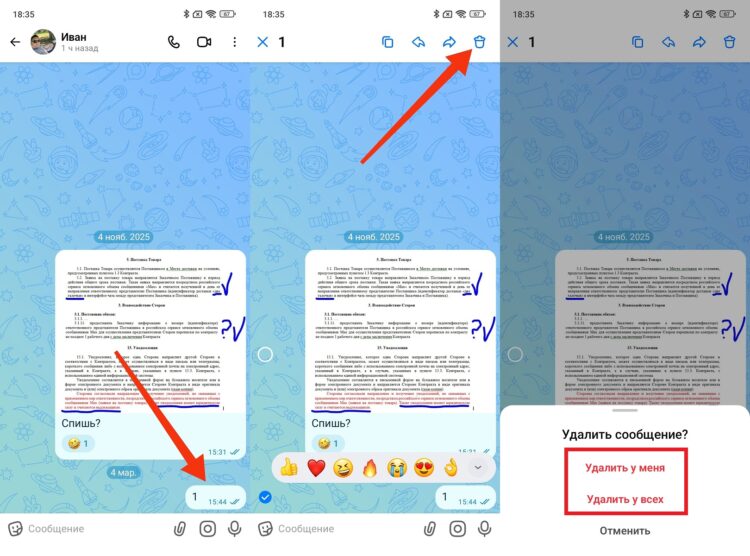
Some messages can be deleted both for yourself and for the other person
After this, the message will disappear from the chat. If you only deleted it for yourself, it will continue to be displayed on the other person’s device.
How to Delete or Clear a Chat in MAX
You can also delete all messages in MAX at once. To do this, follow the instructions:
- Open the chat.
- Tap on the contact’s avatar.
- Tap “More.”
- Select “Clear History” or “Delete Chat.”
- Confirm the deletion.
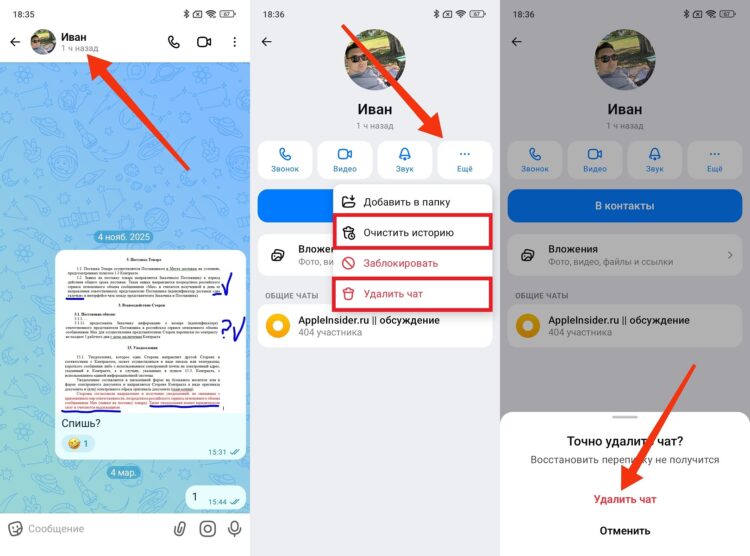
Messages are deleted along with the chat
If you tap “Clear History,” all messages on your device will be erased, but the chat itself will remain in the list. If you choose “Delete Chat,” both the messages and the chat itself will disappear.
How to Restore a Conversation in MAX
Can you restore messages in MAX? Yes, but again with some nuances:
- Messages can only be restored if the entire conversation was cleared;
- You can restore a chat in MAX only within 5 seconds of deletion.
To restore deleted messages in MAX, you need to tap the “Undo” button at the bottom of the screen, which appears immediately after clearing or deleting the chat.
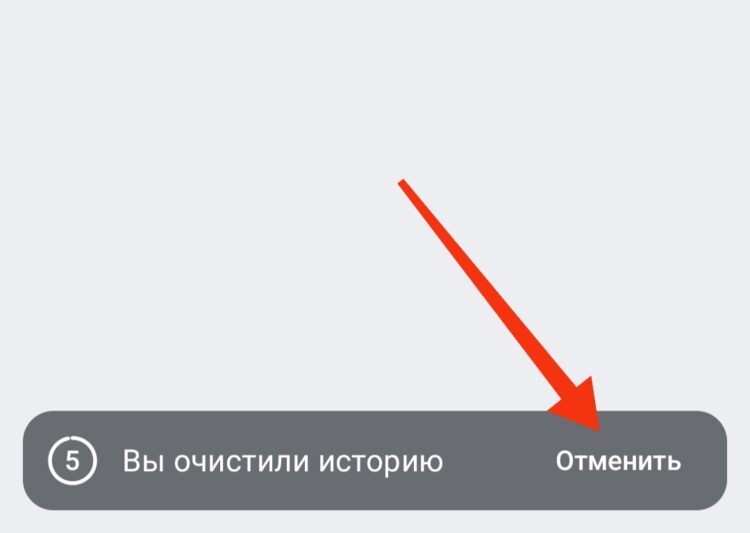
You can undo deletion within 5 seconds
If you don’t manage to do this in time, restoring the conversation in MAX won’t be possible. However, the messages will continue to be displayed on the other person’s device until they decide to get rid of them themselves.


