In recent months, the national messenger has become a must-have app for millions of users, so it’s no surprise that questions about additional profiles are arising. This is especially relevant for those who have already gone through the registration process in the MAX app and understand that one account is enough. After all, some people need a separate profile for work, others for personal communication, and some simply want to keep their contacts separate. Let’s figure out if you can have a second account in MAX and what you’ll need for it.
Creating a second account despite messenger limitations
Why You Need a Second Account in MAX
The need for a second account in MAX arises for the same reasons as in other messengers. One profile is used for personal conversations, the other for work, studies, or communicating with clients. It’s convenient when you don’t want to mix different contacts in one list.
Another reason is using multiple SIM cards. Many people have a work number and a personal one, so it makes sense to have two accounts in MAX, with each tied to its own phone number. This option is often used by entrepreneurs, company employees, and those managing multiple projects. Sometimes a second profile is needed for testing purposes. For example, if someone is helping relatives or colleagues set up a MAX messenger account, it’s easier to have a separate login than to constantly log out of the main one.
Can You Create Two Accounts in MAX
Currently, the messenger has a limitation: one number — one profile. Can you have two accounts in MAX? If you only have one SIM card — no. Each new profile must be linked to a new phone number. This means a second account in MAX is only possible if you have an additional number. Without one, you won’t be able to register another profile, even if you use a different phone or computer.
For comparison, some messengers allow you to quickly switch between profiles. For example, Telegram allows you to use multiple accounts within a single app. But the national messenger lacks this feature. If you need an additional profile, you’ll have to create a new account in MAX with a different SIM card. This is the only official method that works right now.
How to Create a Second Account in MAX
To create a second profile, you need to register again with a new number. The system will automatically create a separate MAX account that won’t be linked to the first one. Instructions:
- Open MAX.
- Go to profile settings.
- Tap “Log Out.”
- Start the registration process.
- Enter a different phone number.
- Confirm the code.
- Create a new profile.
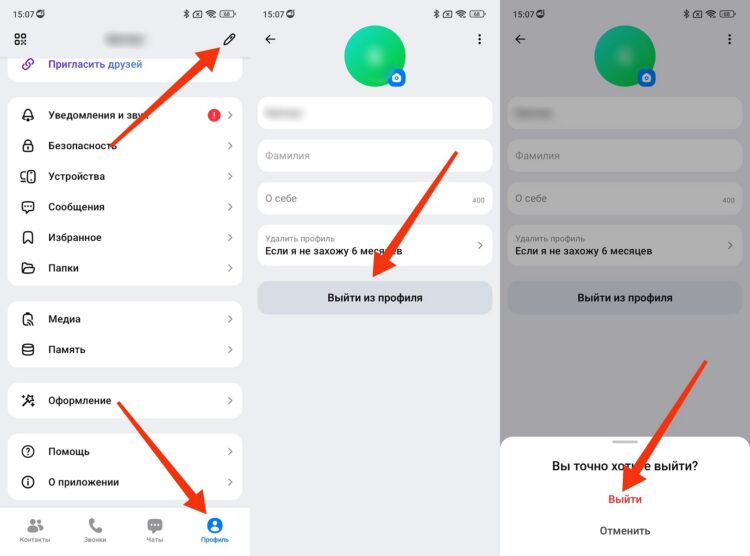
First, you need to log out of your first account
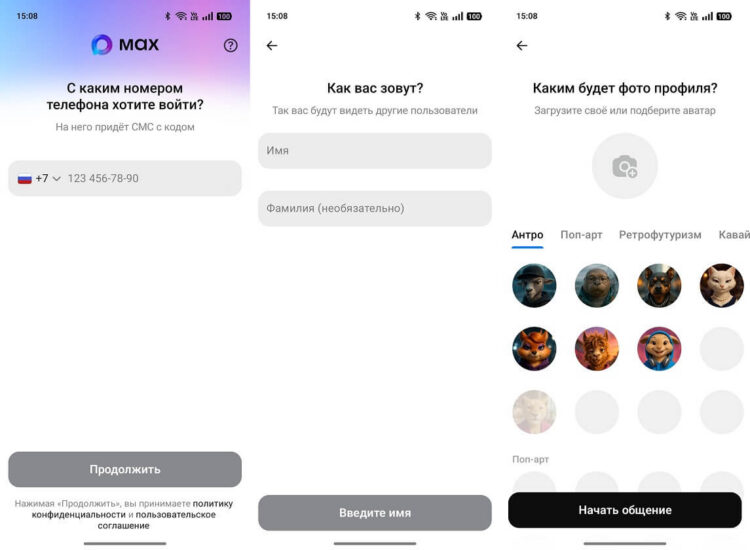
Now simply create another account
After this, a second profile will appear, but the first one will be disconnected on this device. If you need to use both simultaneously, you’ll have to log in from different phones. In that case, it’s convenient to have a separate smartphone ready in advance, especially if you plan to actively use multiple accounts in MAX.
How to Set Up Two Accounts in MAX on One Phone
Although profile switching is not officially supported, there is a workaround. Many smartphones allow you to clone apps. This gives you the chance to run a second copy of the messenger and log in with a different number. This way you can create a second MAX account on one phone without constantly logging out:
- Open Settings.
- Go to the “Apps” section.
- Select “App Cloning.”
- Find MAX.
- Enable cloning.
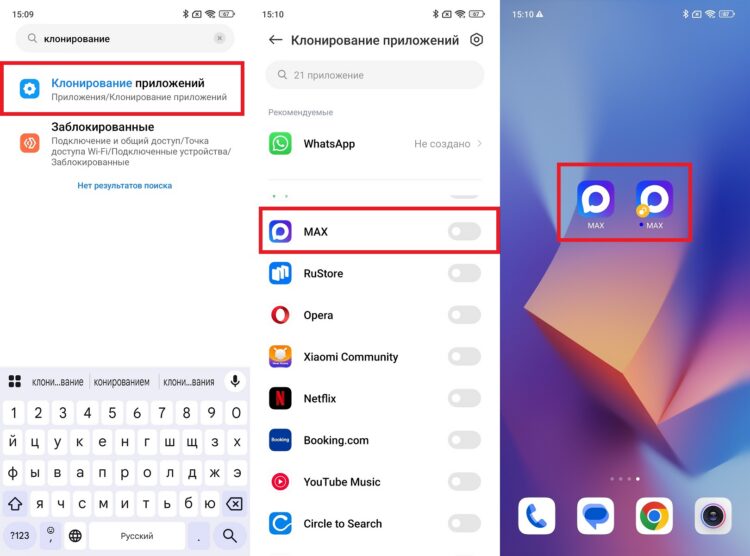
App cloning allows you to use two MAX accounts on one phone
After this, you’ll have two versions of the messenger on your phone. In one, you can keep your main profile, and in the other — create a second account in MAX with a new number. This method works on Xiaomi, Samsung, realme, and some other devices.
Will MAX Add Second Account Support
The developers have already mentioned that the messenger will gradually receive new features. Plans include expanding profile capabilities and improving account management. Therefore, the question of supporting multiple profiles is being discussed quite actively.
For now, you officially cannot use two accounts in MAX within a single app, but there is a possibility that such a feature will appear. The service is developing as a universal platform, and over time it should gain features available in other messengers. Considering the direction of development, it can be assumed that a second account in MAX will become a standard feature once the app receives a full-fledged profile system. But for now, you need a second number or app cloning.


