Positioning itself as a secure messenger, Telegram creates conditions for completely confidential communication. The app has long had secret chats with end-to-end encryption, and the 12.5.0 update introduced the ability to disable message copying in Telegram. With this feature, your contact won’t be able to forward your message to another person, even if the chat isn’t secret.
Message forwarding in Telegram can be disabled, but with some nuances
How to Set Up a Copy Restriction in Telegram
By default, any participant in a Telegram chat can forward messages to other users. This obviously reduces the level of confidentiality, as such copying often compromises people.
To prevent this, you need to set up a copy restriction in Telegram following these instructions:
- Open the chat with the person you want to prevent from forwarding messages.
- Tap on their profile icon.
- Tap the “three dots” in the upper right corner of the screen.
- Go to the “Restrict Copying” section.
- Confirm the restriction.
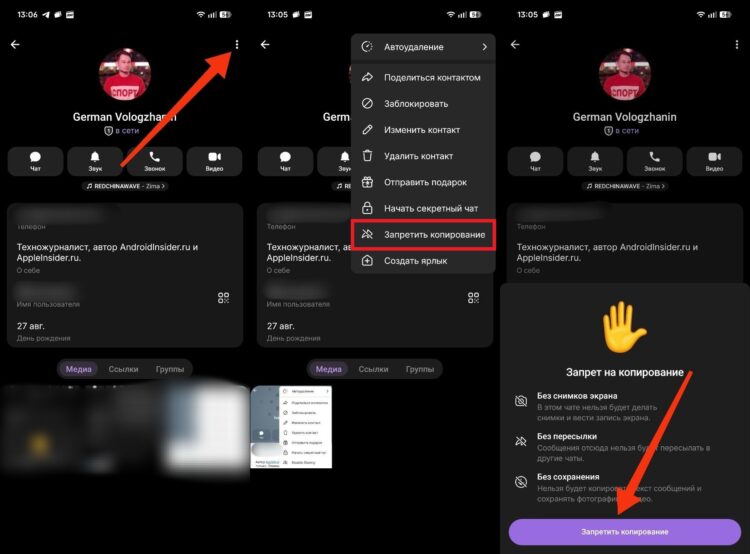
The feature only works for Premium subscribers
After this, your contact will not only be unable to forward messages but also unable to save media files from the chat. Additionally, they will be prohibited from taking screenshots. At the same time, it’s important to note a nuance: the forwarding restriction in Telegram is only available to Premium subscription holders.
Disabling Message Forwarding Without Telegram Premium
If you don’t have a Premium subscription, you can still disable message forwarding in Telegram. However, you’ll need to create a secret chat with the person you want to protect yourself from.
Additionally, all messenger users have the ability to hide their Telegram account so that when a message is forwarded, a third party won’t be able to access your profile:
- Launch Telegram.
- Open the “Settings” tab.
- Go to the “Privacy and Security” section, then — “Forwarded Messages.”
- Set the value to “Everyone.”
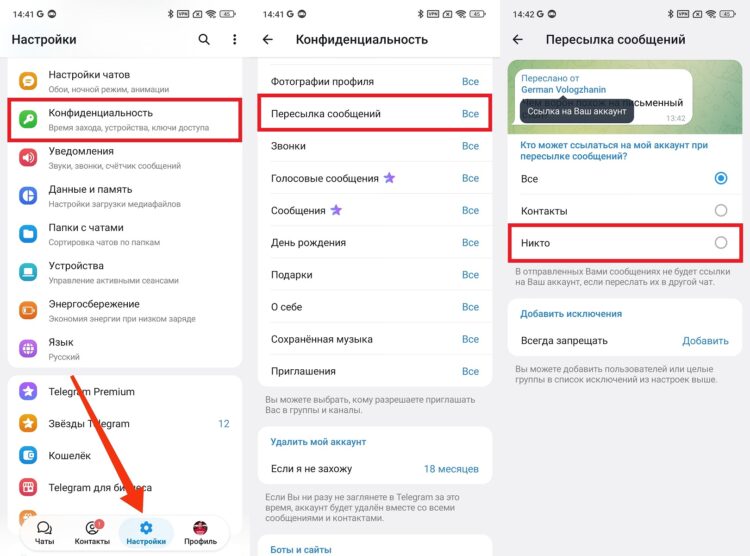
This is a restriction on profile access
Now your messages may still end up in someone else’s hands, but at least without access to your personal profile. And this is just one of many privacy protection features in Telegram.