Telegram is being throttled, other messengers are getting blocked — and all this time, you’ve had a working way to message people right in your pocket. No VPN, no downloading anything new, and no registration. Just the Photos app that comes on every iPhone.

Did you know there’s a messenger in your iPhone gallery?
The concept is simple and, honestly, a bit absurd: you open your iPhone gallery, and instead of vacation photos, there’s a full-blown chat going on. “Hello, where are you?”, “Come in, come in”, emojis — all in the comments under some random photo. Funny, but it works. Let’s break down how it’s set up and what you need to do to get it working for you.
What Can Replace Telegram on iPhone
It all revolves around the “Shared Albums” feature in the Photos app. It appeared in iOS ages ago — originally designed for sharing photos with family and friends. But it has one little-known capability: under every photo in a shared album, you can leave comments. An unlimited number of them. And these comments arrive instantly — just like messages in a regular messenger.

Another hidden iPhone feature
Traffic goes through Apple’s servers. And according to experts, blocking those is significantly harder — if it happened, millions of iPhone owners would lose access to their galleries at once. That’s precisely why the Photos feature on iPhone remains accessible in Russia without any restrictions so far.
The conversation looks like this: all messages are sorted by time, notifications arrive immediately, you can use emojis and delete what you’ve written. Essentially — it’s almost a full-fledged chat, just with a photo instead of an avatar.
How to Create a Shared Album in iOS
Here’s how to set it up — it’ll take literally five minutes:
- Open the Photos app on your iPhone
- Go to the “Albums” tab at the bottom of the screen
- Scroll down to the “Shared Albums” section and tap “New Shared Album”
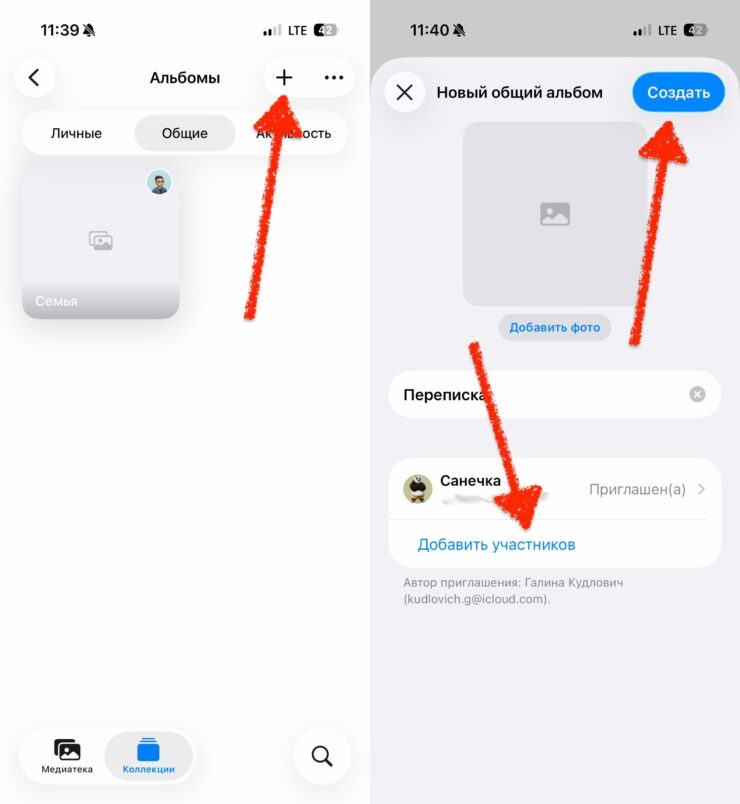
Create a shared album and invite participants
- Come up with a name (anything goes — even “Kittens”)
- Add the person you need from your contacts — they’ll receive an invitation
- Once your contact accepts the invitation, upload any photo to the album
- Tap on the photo and select “Comment” — and off you go
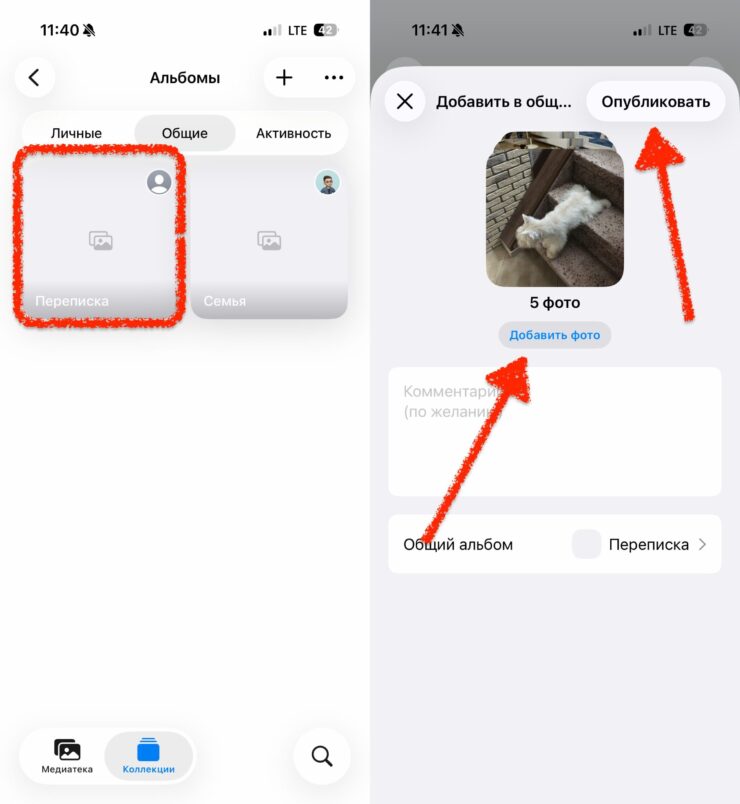
Add a photo and start chatting
Important note: this feature only works between iPhone owners. If your contact is on Android — this method won’t work. But if both of you are on iOS — everything works without extra apps and without using foreign servers.
Another nuance: photos in shared albums don’t take up space in your iCloud, because Apple stores them for free — that’s a nice bonus.
Can You Use the Gallery Instead of Telegram
Honestly — you can’t call it a full replacement. But as a backup option, it works great. Here’s what you get and what you don’t:
What you get:
- Instant message delivery
- On-screen notifications
- Emojis
- Ability to delete messages
- Works through Apple’s servers — not blocked so far
What you don’t get:
- Voice messages
- File and document sharing
- Group chats in the traditional sense
- Offline functionality
- Android support
And of course, it all looks a bit weird. You open your gallery — and there’s a conversation under a photo of a cactus. But when you have no choice — even a cactus will do. Yes, you can’t send files here — but that’s actually a plus: no one can send you a virus this way.
Is It Safe to Chat Through the iPhone Gallery
This one’s not so clear-cut. On one hand, traffic goes through Apple’s servers, and the company is known for taking privacy seriously. On the other hand, chatting in photo comments is technically not an encrypted messenger with end-to-end encryption like, say, Signal.

But hacking such a conversation is still difficult
For everyday conversations — it’s perfectly fine. For anything truly confidential — you’re better off looking for other options.
What to Do If “Shared Albums” Aren’t Working
If the “New Shared Album” button isn’t active or the section isn’t visible at all — the feature is most likely just turned off in settings. Here’s how to enable it:
- Open “Settings” on your iPhone
- Tap your name at the top
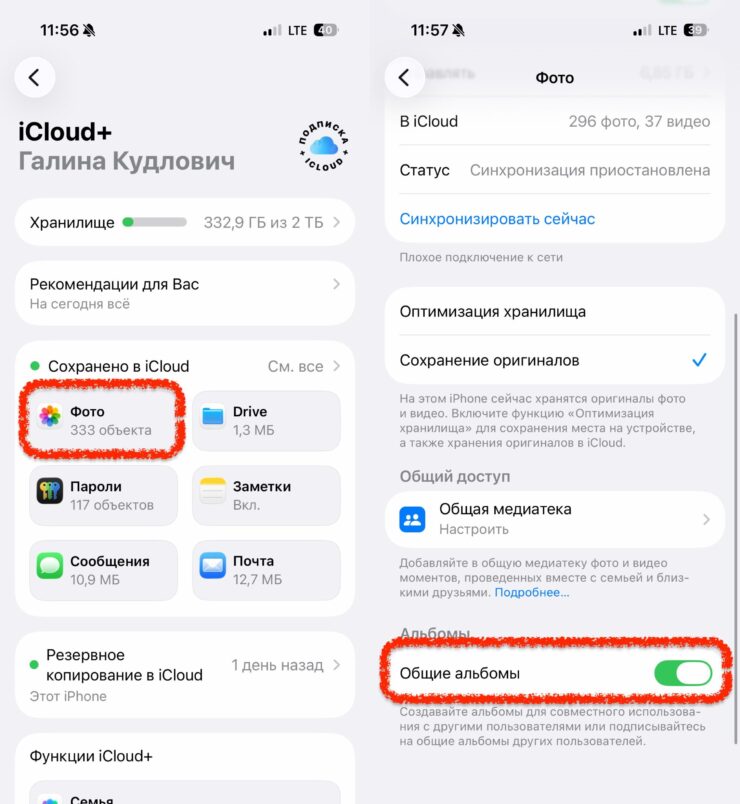
Check this setting
- Select iCloud — “Photos”
- Toggle on “Shared Albums”
After that, go back to the Photos app — everything should appear. If that still doesn’t help, check whether your iOS is up to date: on very old versions, the interface may look different.
Is It Worth Using the Gallery for Messaging
If Telegram works fine — of course, it’s better to use that. It’s simply more convenient, familiar, and feature-rich. But if something goes wrong and you need a quick backup option — a shared album on iPhone is a pretty decent solution. Especially if all your close ones are also on iOS.
The method works, it’s been tested, and you don’t need to download anything. The only requirement is an internet connection. Oh, and a bit of readiness for the fact that your chat now lives in your gallery, right next to birthday party photos. That’s your messenger from Tim Cook, right there.