Your MAX account number is not just contact information that can be updated in your profile. It’s the foundation of the entire account, without which the messenger simply doesn’t exist. That’s why the question of changing your number turns out to be more complicated than it seems. When registering in MAX, your phone number becomes the sole user identifier — and changing this decision after the fact through standard means is not possible.
Figuring out number replacement in MAX
What MAX Does with Your Phone Number
MAX uses the phone number to identify each user in the system. This isn’t an arbitrary developer decision but an architectural principle: the messenger was originally conceived as a national platform tied to a real identity. The number is used for login, operation confirmation, synchronization with Gosuslugi (Government Services), and Digital ID linking. It’s through this number that age verification at checkout, access to medical data, and other government services work.
An important consequence follows from this: two numbers in MAX mean two completely different accounts. One number — one profile, one chat history, one set of subscriptions and contacts. It’s impossible to cross-link or merge them. That’s why when choosing a number for registration, you should immediately use the one you’ll be using permanently. Hiding your phone number in MAX from others is possible, but changing it is another matter entirely.
Can You Change Your Number in MAX
In short: no. The app settings don’t have a “Change Number,” “Change Phone,” or anything similar option. How to change your number in MAX through standard means — you can’t. The developers intentionally didn’t provide this capability: from the system’s perspective, changing a number is equivalent to changing the user, not simply updating contact information. All links to government services, financial organizations, and Digital ID are tied specifically to the number, so replacing it would break the entire identification chain.

In MAX everything is tied to our number
The only thing that can formally be considered a number change is to set up MAX on a different number by registering a new account. This isn’t a number change in the usual sense, but from a practical standpoint the result is similar: you start using the messenger with a new number.
What Happens If You Create a New Account in MAX
Before taking action — a few important nuances. When creating a second account in MAX, the old one doesn’t disappear automatically. It continues to exist on the messenger’s servers. If you simply log out and register with a new number, the old profile will remain active until it’s manually deleted or until the system deactivates it due to prolonged inactivity.
Transferring chat history from the old account to the new one is impossible. Chat history, contacts, channel subscriptions, Digital ID — all of this stays on the old number and won’t transfer automatically. In effect, we’re talking about a complete fresh start. If you don’t need two accounts in MAX simultaneously, it’s better to delete the old account before registering a new one — that’s the cleaner approach.
How to Change Your Phone Number in MAX
Strictly speaking, this isn’t about changing a number but about transitioning to a new account. Here’s how to do it:
- Open the MAX app and go to the “Profile” tab.
- If you want to keep the old account — simply log out. If you don’t need it — delete it through “Settings” — “Account” — “Delete Account.”
- Restart the MAX messenger.
- Enter your new phone number.
- Receive and enter the SMS confirmation code.
- Fill out your profile: name, photo, status.
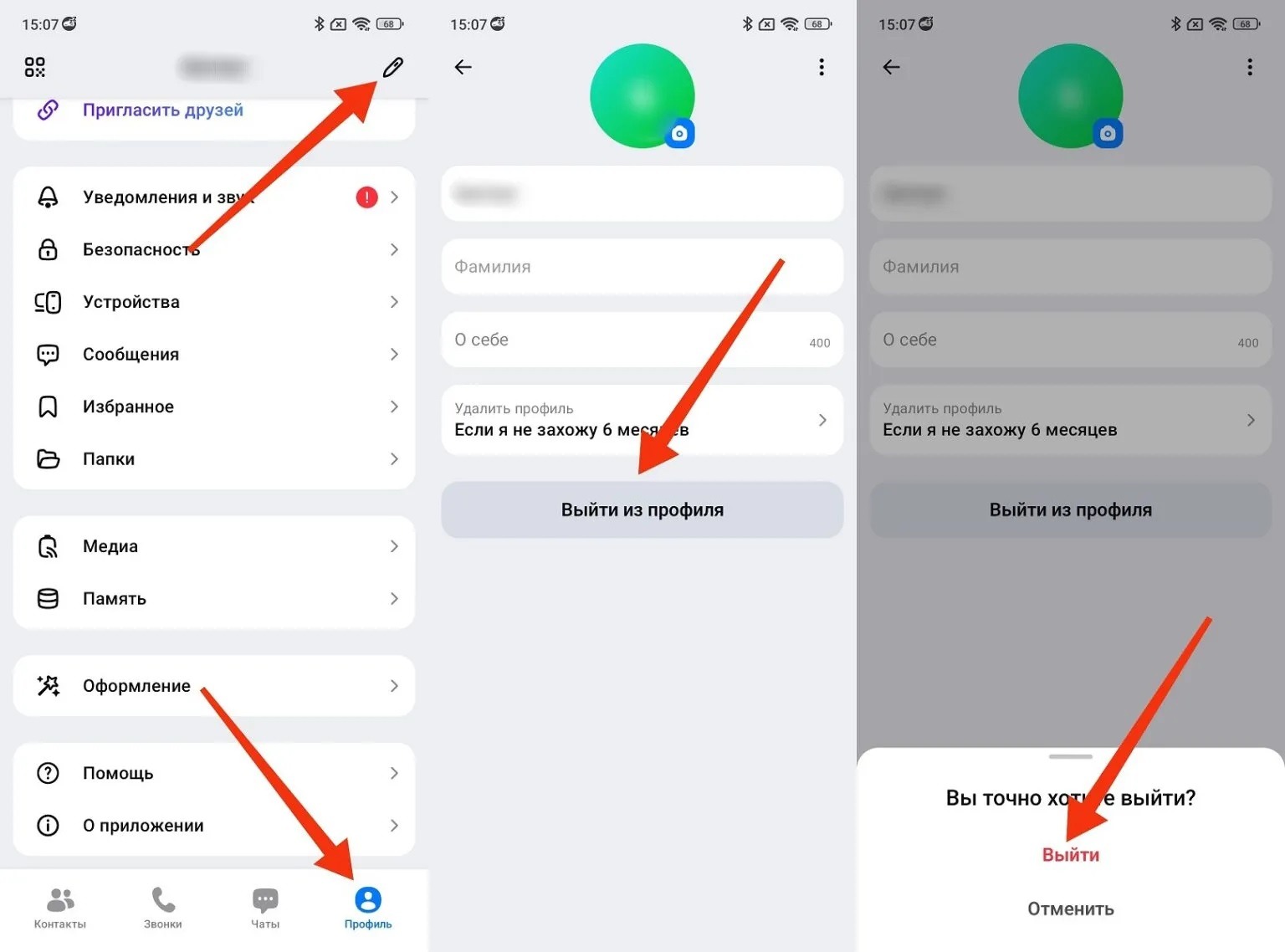
You can log out of the account or even completely delete it
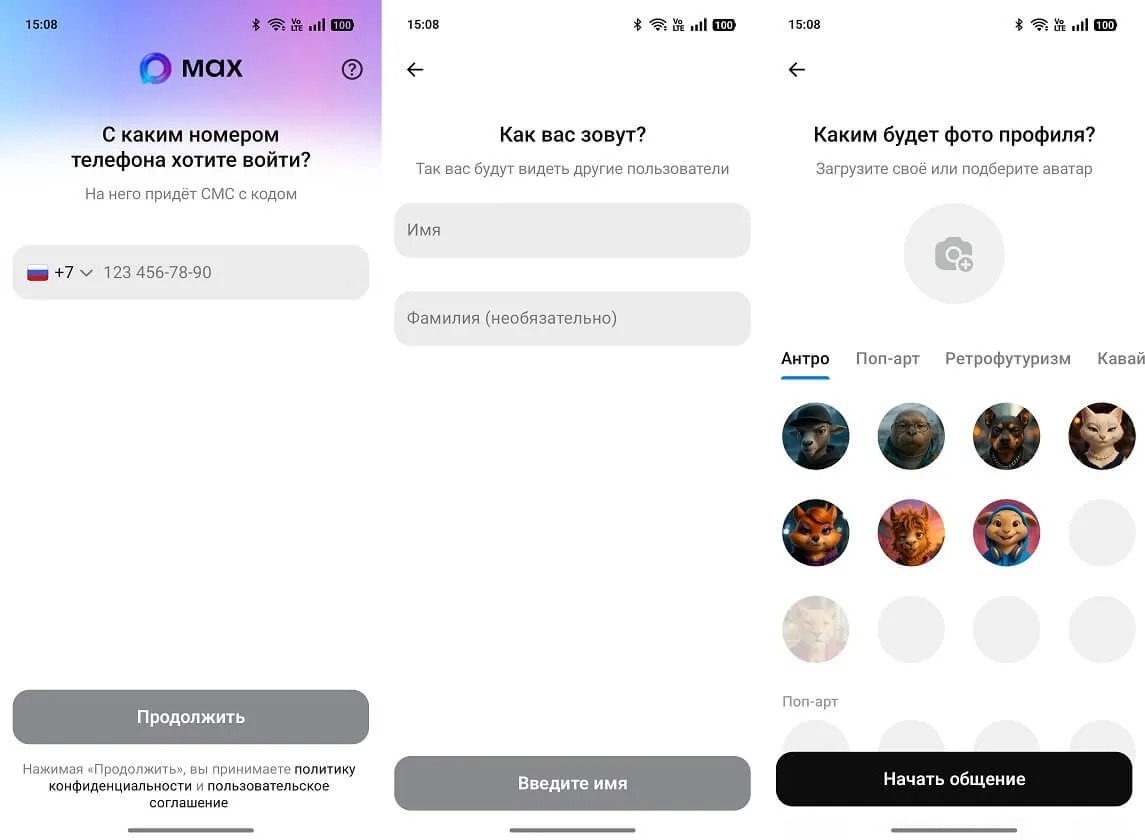
You’ll have to register a new account with a second number
After this, the messenger will be tied to the new number. All contacts in your phone book who are registered in MAX will sync automatically. You’ll have to manually rejoin the channels and groups you need — this is the only inconvenience that can’t be avoided.
It’s worth noting that MAX doesn’t work without a phone number at all — you can neither register nor log in without one. If your number is lost or unavailable and you need to recover your account, the only option is to contact MAX support directly. There is no standard recovery method through email or other data in the messenger.


