MAX largely copies competitor apps by providing access to basic security features. In particular, you can enable two-factor authentication or hide your last seen time. Besides that, every user of the national messenger has a personal block list. Below, we’ll explain how to block a contact in MAX or any other unwanted person.
Learn about blocking people in MAX
How to Block Someone in MAX
Blocking people in the national messenger is available through the profile page. Here’s how to add someone to the block list in MAX:
- Find the user’s chat or contact.
- Tap on their profile icon.
- Tap “More,” then “Block.”
- Confirm the block.
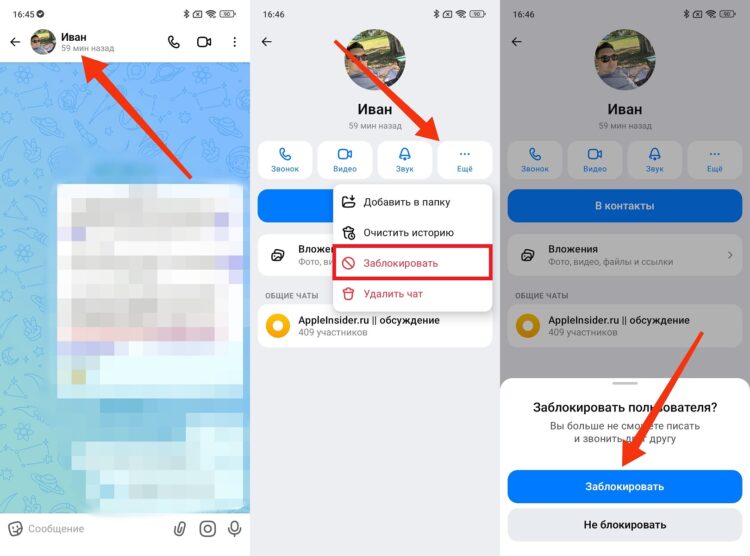
You can block a person through their profile
After that, the person will be added to the MAX block list. This means they will no longer be able to contact you. But the consequences of blocking in MAX are worth discussing separately.
What a Blocked Person Sees in MAX
Unlike foreign messengers, a blocked user in MAX can still see your avatar. Additionally, they can see when you last logged into the messenger — unless you’ve gone invisible in MAX.
However, a person on the block list in MAX cannot send you messages. After sending, they will only see a single checkmark. And when trying to reach you via audio or video call, a notification will appear on their screen saying “Only accepts calls from contacts.”
Where Is the Block List in MAX
You can always view the block list in MAX to review blocked users:
- Open the “Profile” tab.
- Go to the “Security” section.
- Open the block list.
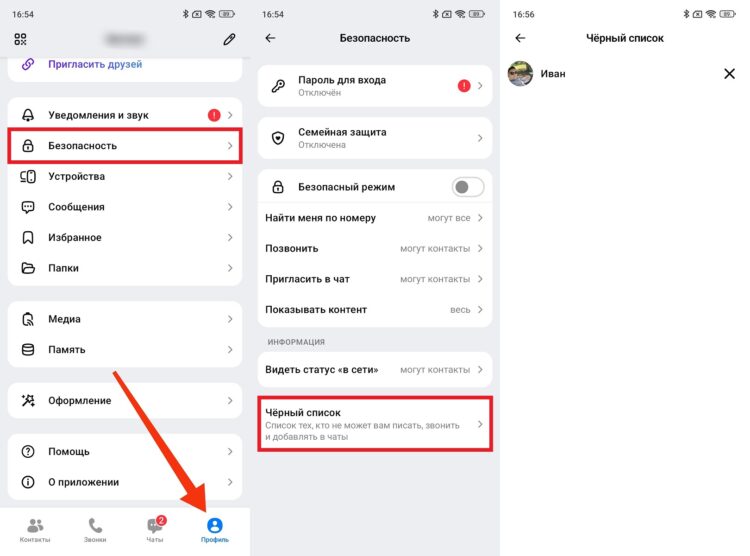
The block list is accessed through settings
Here, all blocked users in MAX will be displayed. Despite the restrictions, you can open their profile. However, to start a chat, you’ll need to unblock the person.
How to Unblock a Contact in MAX
You can unblock a person in MAX through their profile by tapping the corresponding button. But the easiest way is through the block list:
- Open the block list in MAX.
- Tap the “X” next to the blocked user.
- Confirm the unblock.
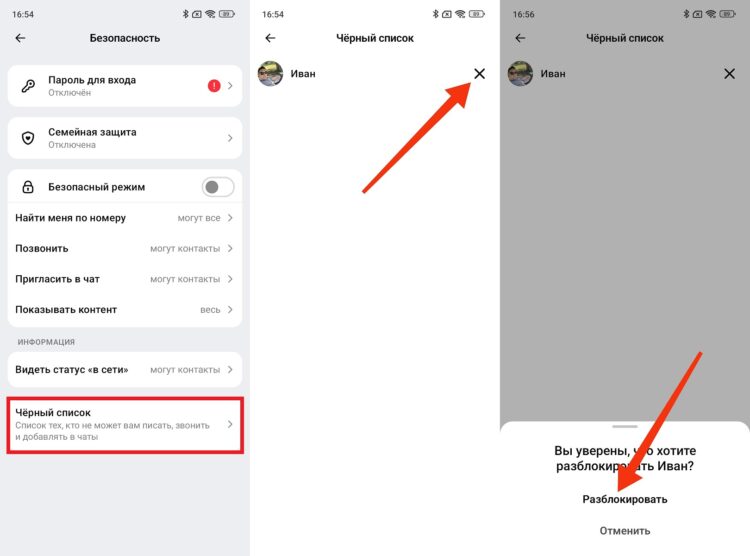
The block is removed through the block list
After that, the user will be able to contact you, and you can message them or make an audio/video call. At the same time, you can always block them again.