When Apple introduces new MacBooks, everyone usually focuses on the processors, screens, and battery life. But sometimes the most interesting changes are hiding literally under your fingers. Last week, the company announced updated MacBook Air, MacBook Pro, and MacBook Neo, and almost nobody noticed that the keyboard had changed. So how could something like this be missed, given that the change affects everyone buying laptops with the most popular keyboard layout?
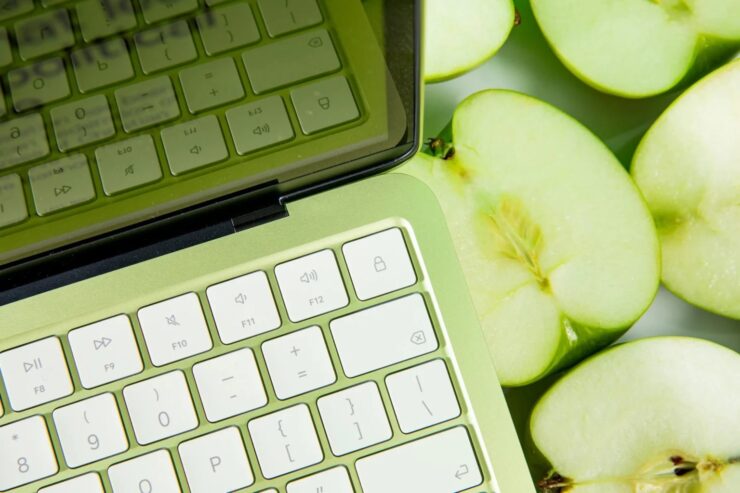
Fortunately, Apple didn’t change the mechanism — only the markings on the keys. Image: The Verge
What Changed in the New MacBook Keyboard
On the new MacBook Air, MacBook Pro, and MacBook Neo, the Tab, Caps Lock, Shift, Return, and Delete keys now look different. Instead of the familiar text labels in English, they now feature glyphs — graphic symbols representing the key’s function. On previous MacBook generations, these keys were labeled with words, and it had been that way for many years.
The change was first spotted by a user named Mr. Macintosh, who noticed the new keyboards last week. It might seem like a small thing, but if you look closely, the difference is striking: the keyboard looks noticeably cleaner and more minimalist. In short, Apple has taken another step toward a universal design that doesn’t depend on language.
Glyphs instead of words — a small touch that makes the keyboard look visually tidier. Europeans are shrugging right now: they’ve had this for a long time.
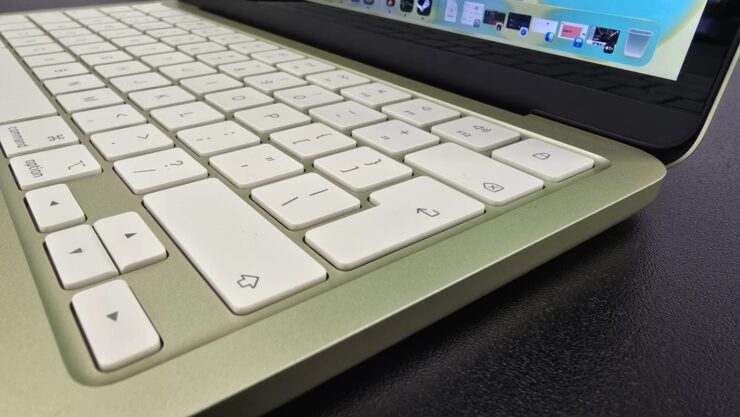
Here they are, the new keys. Though for some, this is nothing new at all. Image: TechRadar
Which Countries Are Affected by the MacBook Keyboard Change
The change affects the US English layout. This is the standard layout not only for the United States but also for MacBooks sold in Canada, Australia, New Zealand, and Singapore. So the new key design effectively rolls out across several major markets at once.
But here’s the interesting part: for Europe, there’s absolutely nothing new about this. Apple has long used glyphs on keyboards with the British English layout and layouts for other European languages. There, the Tab, Caps Lock, Shift, Return, and Delete keys have been marked with symbols rather than text for many years. So essentially, the company has simply brought the American version in line with the standard that has long been in place in Europe and other regions of the world.
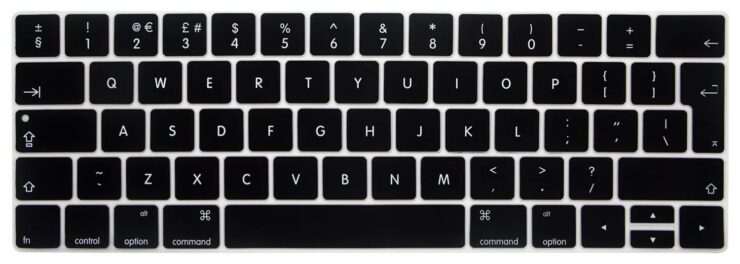
European laptops haven’t had text labels on these keys for a long time. Image: Apple
It’s worth noting that this kind of unification isn’t just a design whim. When millions of users around the world work with the same symbols on their keys, it lowers the barrier to entry for those switching between different layouts or picking up a MacBook for the first time. A glyph doesn’t need to be translated — it’s intuitively understood. Unlike, say, Return, which replaces the European and universally recognized Enter.
Why Apple Replaced Text with Glyphs
At first glance, replacing words with symbols seems purely cosmetic. But there’s actually a logic of unification behind it. When a key features a symbol rather than a word in a specific language, the keyboard becomes universal for any user, regardless of what language they speak. An arrow on Shift or a symbol on Tab is understood without translation.
This also makes the keyboard design more cohesive. The function keys in the top row of MacBooks have long been marked exclusively with glyphs. Now the main key block looks consistent with that same style — and this is clearly a deliberate step.
Now the main key block looks consistent with that same style. In other words, Apple has eliminated a visual inconsistency that had existed for years and, by all appearances, had long irritated designers within the company.
The change applies to all three new models: MacBook Air, MacBook Pro, and MacBook Neo. Sales are set to begin this Wednesday.
Should You Pay Attention to the New Keyboard
If you’re used to text labels and are switching to a new MacBook, it might feel unfamiliar at first. However, the same Tab, Caps Lock, Shift, Return, and Delete keys are in their standard positions, so adaptation should take a couple of days at most. And if you’ve ever used an Apple European layout or an external Magic Keyboard, you won’t notice the difference at all.
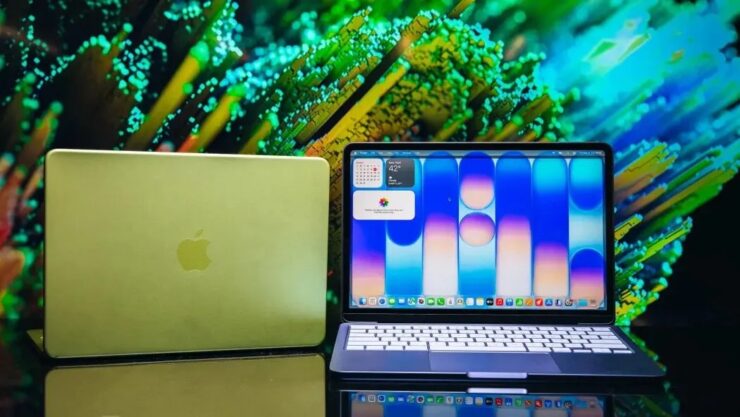
MacBook Neo also got the updated keyboard with glyphs — the newcomer received the full set of changes. Image: PCMag
For those ordering a MacBook from countries like Canada, Australia, or Singapore, it’s important to understand: the US layout now comes with glyphs by default. There’s no option to choose the “old” version with text labels — this decision was made at the manufacturing level and is uniformly applied to all devices in this product lineup.
Getting used to glyphs is easier than it seems. The main thing is not to look at the keyboard while typing.
This is exactly the kind of case where Apple changes something small but well thought out. A minor change in key design reflects the company’s broader philosophy: making products intuitively understandable regardless of the user’s geography or language. The new MacBook Air, MacBook Pro, and MacBook Neo go on sale this Wednesday, and now you know exactly what to look for when you first open the lid.