When Apple releases updates for iPhone, iPad, and Mac, everything usually looks familiar. For example, iOS 26.3.1 comes out with new features and fixes, you install it and move on. But this time, the company released a rather unusual update. This is the first public “Background Security Improvement” update, which is now available for iPhone, iPad, and Mac.
Apple released the first background security update for its devices
At first glance, it might seem like some minor technical detail not worth paying attention to. But in reality, it’s much more interesting. Apple has essentially launched a new way to quickly patch dangerous vulnerabilities without waiting for major iOS, iPadOS, and macOS updates. And in some cases, this is even more important than yet another build with new features.
What Does Background Security Improvement Mean on iPhone, iPad, and Mac
Background Security Improvement is a new format of small security updates that Apple can release separately from full system updates. Simply put, if previously fixing an important issue required waiting for a new version of iOS or macOS, now the company can deliver the patch faster and more precisely.
Apple explicitly states that this mechanism is designed for releasing lightweight security updates for Safari, the WebKit engine, and other system libraries that benefit from small regular fixes between major updates. This means device protection can be strengthened more frequently, and users won’t have to download a large system package every time.
Four versions of this update have been released simultaneously:
- iOS 26.3.1 (a)
- iPadOS 26.3.1 (a)
- macOS 26.3.1 (a)
- macOS 26.3.2 (a)
Two versions for macOS were likely needed because the new MacBook Neo runs on a newer version of macOS 26 than other computers running macOS Tahoe. So Apple had to prepare a separate patch variant.
What Apple Fixed in the New Security Update
This time, Apple released a fix for WebKit. This is the engine that powers Safari and many web content rendering elements in the system. So the issue affects not just the browser as a standalone app, but the overall processing of web pages and internet content.
According to Apple’s description, the vulnerability was related to specially crafted malicious web content being able to bypass the Same Origin Policy. To put it simply, this is one of the fundamental security rules in a browser that prevents websites from freely accessing data from other sites. Violating this restriction is already a serious matter because it concerns a fundamental web protection mechanism.
The company clarifies that the issue was in the Navigation API and was resolved through improved input validation. For the average user, this means one thing: Apple found a potentially dangerous vulnerability and patched it with a separate small update, without waiting for the next major system release.
Where to Find the Security Update on iPhone and iPad
On iPhone and iPad, Apple has placed this option not where many users are used to looking for regular updates. So it’s not surprising that some users simply won’t know where to look for such patches. Everything is checked through the Privacy and Security section. Here’s how to do it:
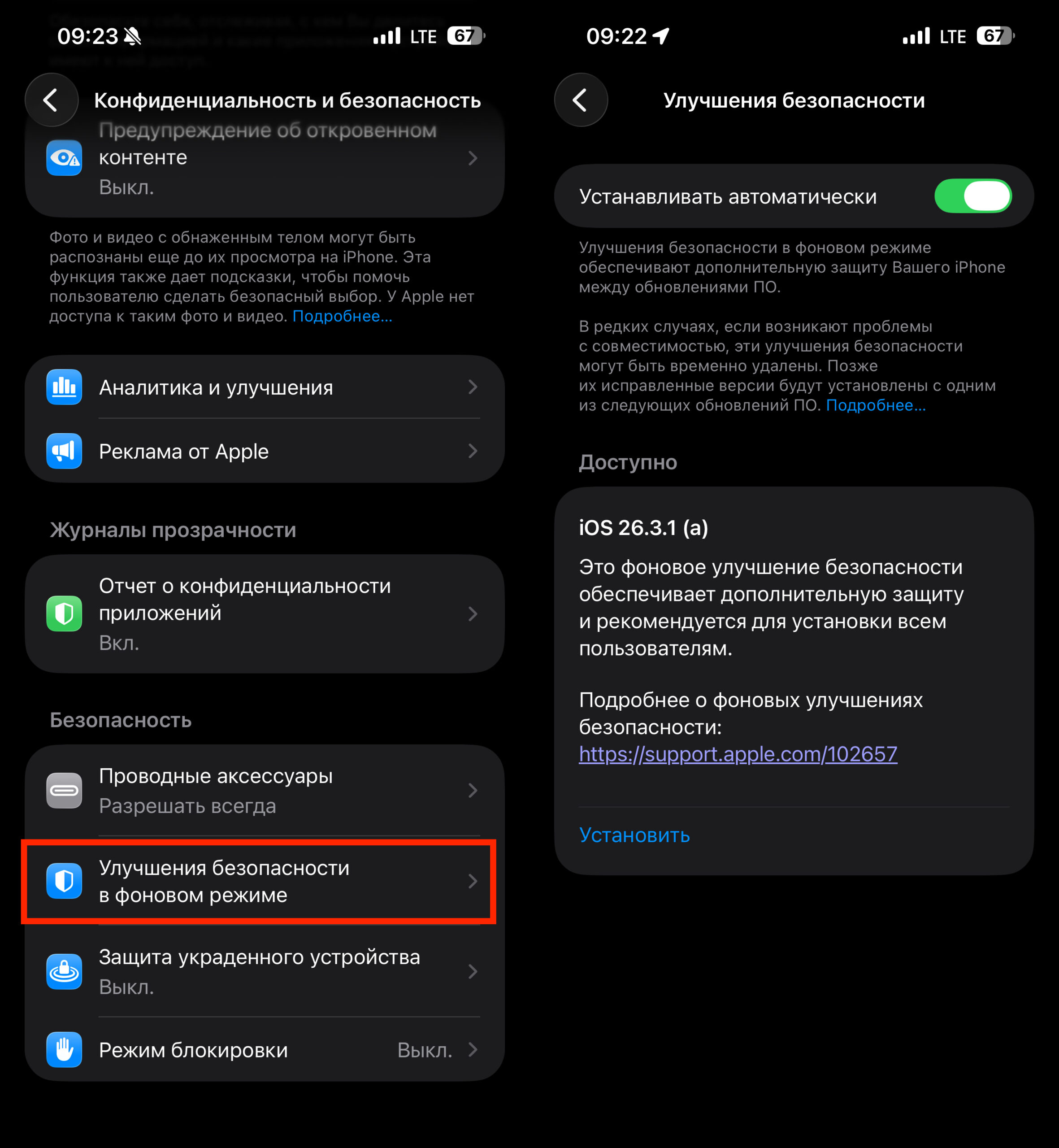
On iPhone, you need to look for the update here
- Open “Settings.”
- Go to “Privacy & Security.”
- Check if a new update is available under “Background Security Improvements.”
- If the update appears, install it.
This is worth doing even if you recently updated your iPhone or iPad. Background Security Improvement can be released separately and may not coincide with regular iOS and iPadOS versions.
How to Check Apple’s Security Patch on Mac
On Mac, the path is similar, but everything is located in macOS System Settings. The logic is the same: you can receive the security update separately, without the usual large system update. Here’s how to check:
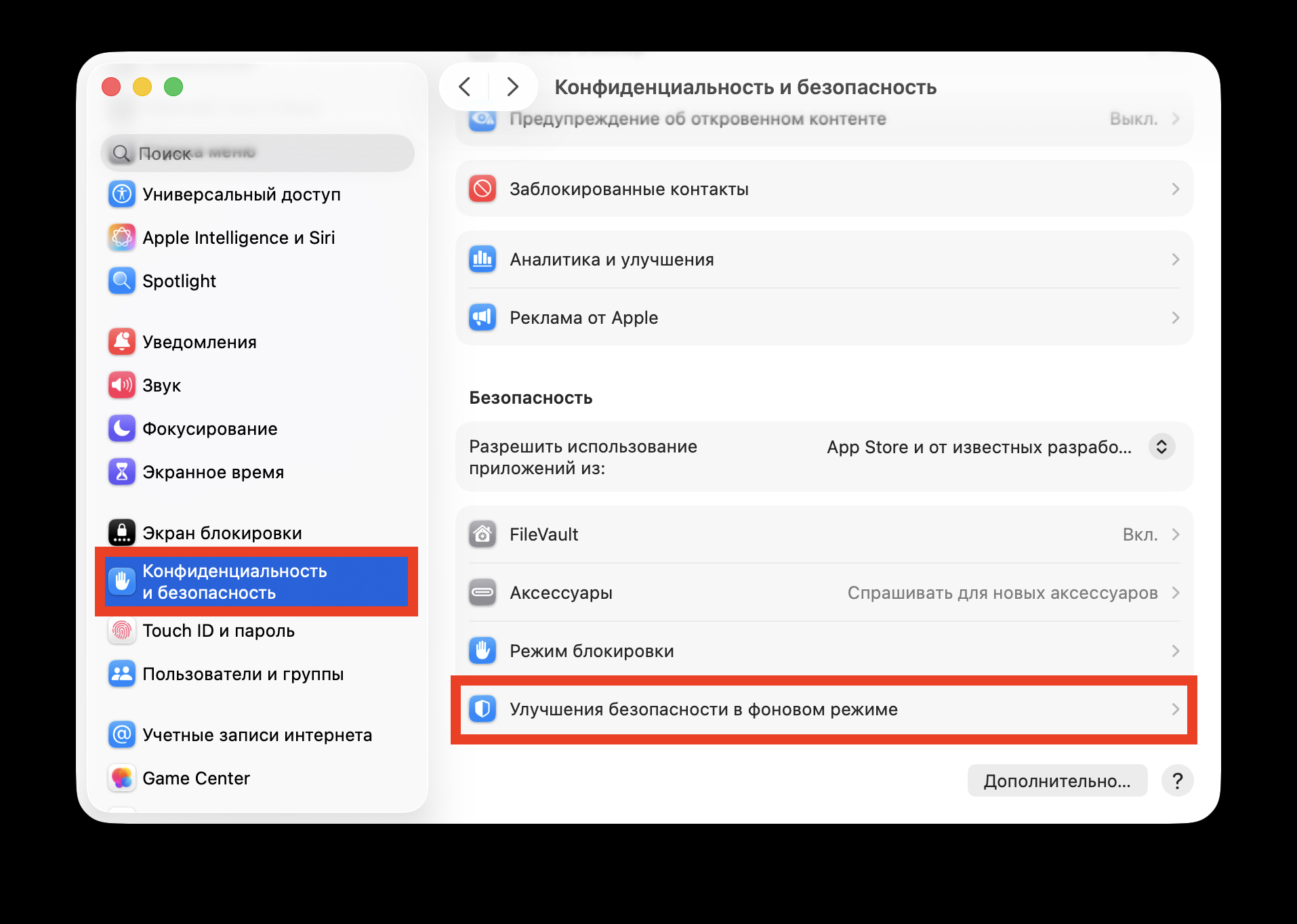
On Mac, the patch is hidden here
- Open “System Settings.”
- Go to “Privacy & Security.”
- Check for an update under “Background Security Improvements” and install it if available.
For Mac owners, this is especially important because the vulnerability concerns WebKit, meaning it potentially affects working with web content throughout the system. Even if you don’t use Safari as your primary browser, you definitely shouldn’t ignore such patches.
Should You Install Apple’s Security Patch Right Away
Yes, it’s better not to delay such updates. Unlike major releases, where many people first wait for feedback on battery life, overheating, and potential bugs, this is specifically a targeted security fix. This isn’t an update for new features — it’s a patch for a potentially dangerous vulnerability.
That’s exactly why the emergence of Background Security Improvement can be considered good news. Apple now has a tool that allows it to close security holes faster, and users get the ability to receive protection without waiting for the next major version of iOS, iPadOS, or macOS. Most likely, there will be more of these small background updates in the future, and this is precisely the case where an inconspicuous innovation truly makes the Apple ecosystem safer.


